
Skip to main content
How Can We Help?
Search for answers or browse our knowledge base.
-
Booking Tasks
-
Dashboards
-
General Use
- Accept Tips without an Integrated Payment Processor
- Availability Tab
- Breed Manager
- Can I Automatically Process a Payment for a Deposit?
- Customer Profile
- Dashboard Calendar - Different views and filters
- Headings & Organization
- Holiday Hours
- How can I invoice my clients?
- How can my customers request dates or date and times for my services?
- How do I add a new customer?
- How do I buy a package from the admin side?
- How do I connect ProPet + Zapier?
- How do I contact customer support?
- How do I Manage My Customer’s Online Payment Options
- How do I Manage My Customer’s Payment Information? Add Credit Card? Process Payment?
- How do I remove credit from an account?
- How do I require initials for change requests?
- How do I set up my customer scheduling mode?
- How do I setup and use the retail module?
- How does the Buddy and Enemy List work?
- How does the MailChimp Integration Work?
- How to Create Report Cards
- How to Enable Online and Integrated Payments - Payments and Order Payment options
- Kennel View for Boarding and Daycare
- Notification Section
- Ongoing schedules
- Online Payments Set Up and Connection
- Pending Bookings
- Requests: How do I confirm and what will I see?
- Scheduled Events Report
- Smart Feeding Feature
- Smart Medication - Admin View
- Smart Medication - Customer Experience
- Split Kennels
- Vaccination Settings and How They Can Help!
- What are "Open Daycare Orders"?
- Your Account Management
- Show all articles ( 23 ) Collapse Articles
-
Getting Started
- Can each of my staff members have their own account?
- Coupon Codes
- Help! I'm not seeing any notifications!
- How do I connect Chosen Payments to ProPet?
- How do I connect my Chosen Payments merchant terminal to ProPet?
- How do I connect Stripe to ProPet?
- How do I migrate my data from my previous kennel software?
- How do I setup pooled availability for appointments?
- How many people can access the same account at the same time?
- Setting up and using the Quickbooks Online Integration
- Smart Medication Set Up
- User Management
-
Manager Reports
-
Manager Troubleshooting
-
Reports
You are here:
Print
Last Updated On
To edit a customer’s credit, you will first need to navigate to the customer profile, then select either the:
- “Credit History” on the side column below the BOOK NOW button.
OR - The blue highlighted dollar amount beside “Available Credit”
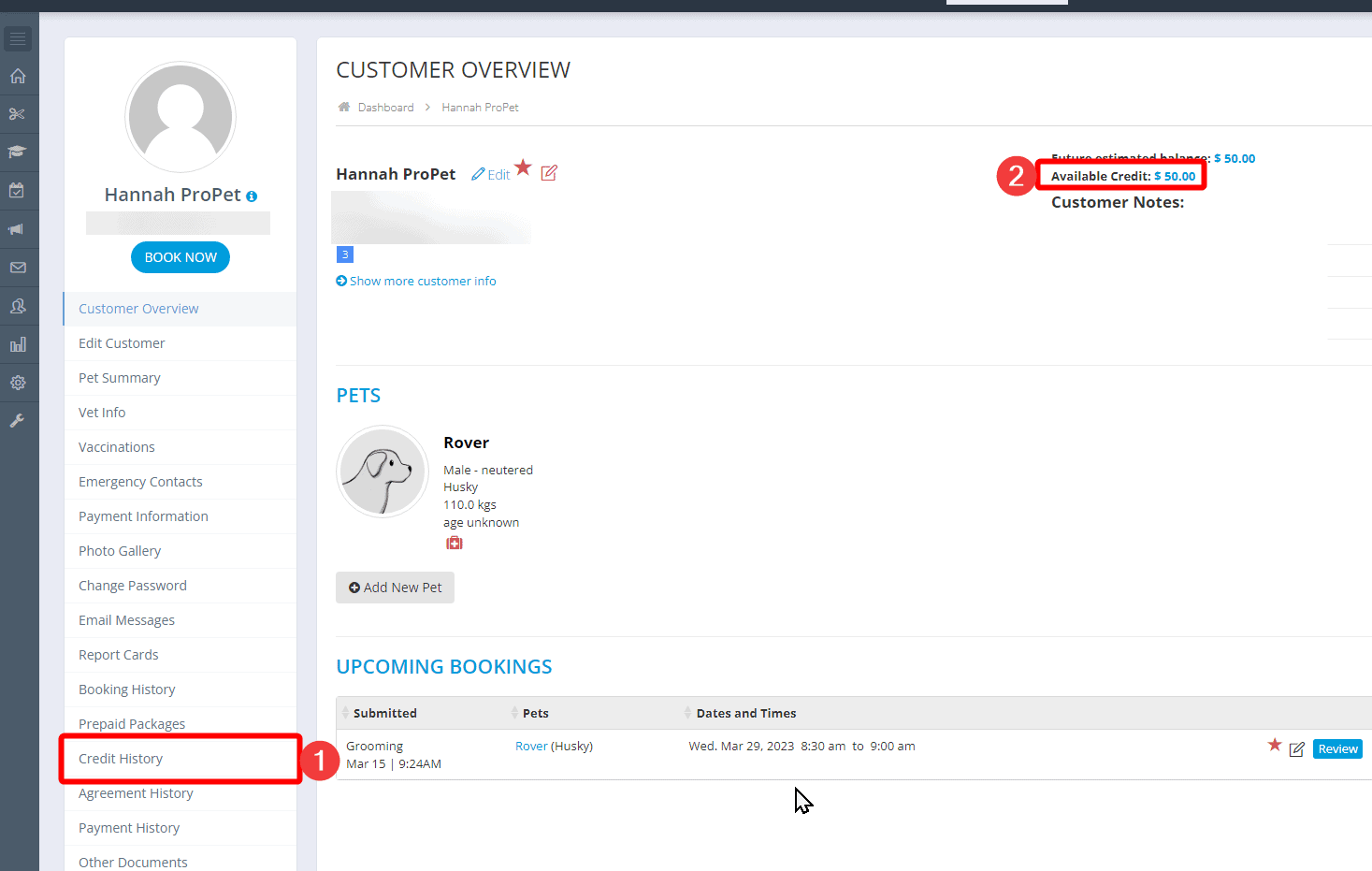
Then select the “Edit” highlighted in blue and adjust the credit as required (including adding notes regarding the requirement for the change) and “Save Changes”.

If you want to remove the entire credit amount, check out how to remove the credit.

Recent Comments