
Search for answers or browse our knowledge base.
What the Memberships feature consists of:
This new ProPet feature will enable you to register your regular customers up for a membership with your facility and to be invoiced on a regular basis. A membership billing cycle can be set up as Weekly, Monthly or Annually and you would create a package of membership benefits that will be available during this billing cycle. Currently, the membership package functions like a prepaid package, where you can choose the quantity of a rate that is included in the membership fee.
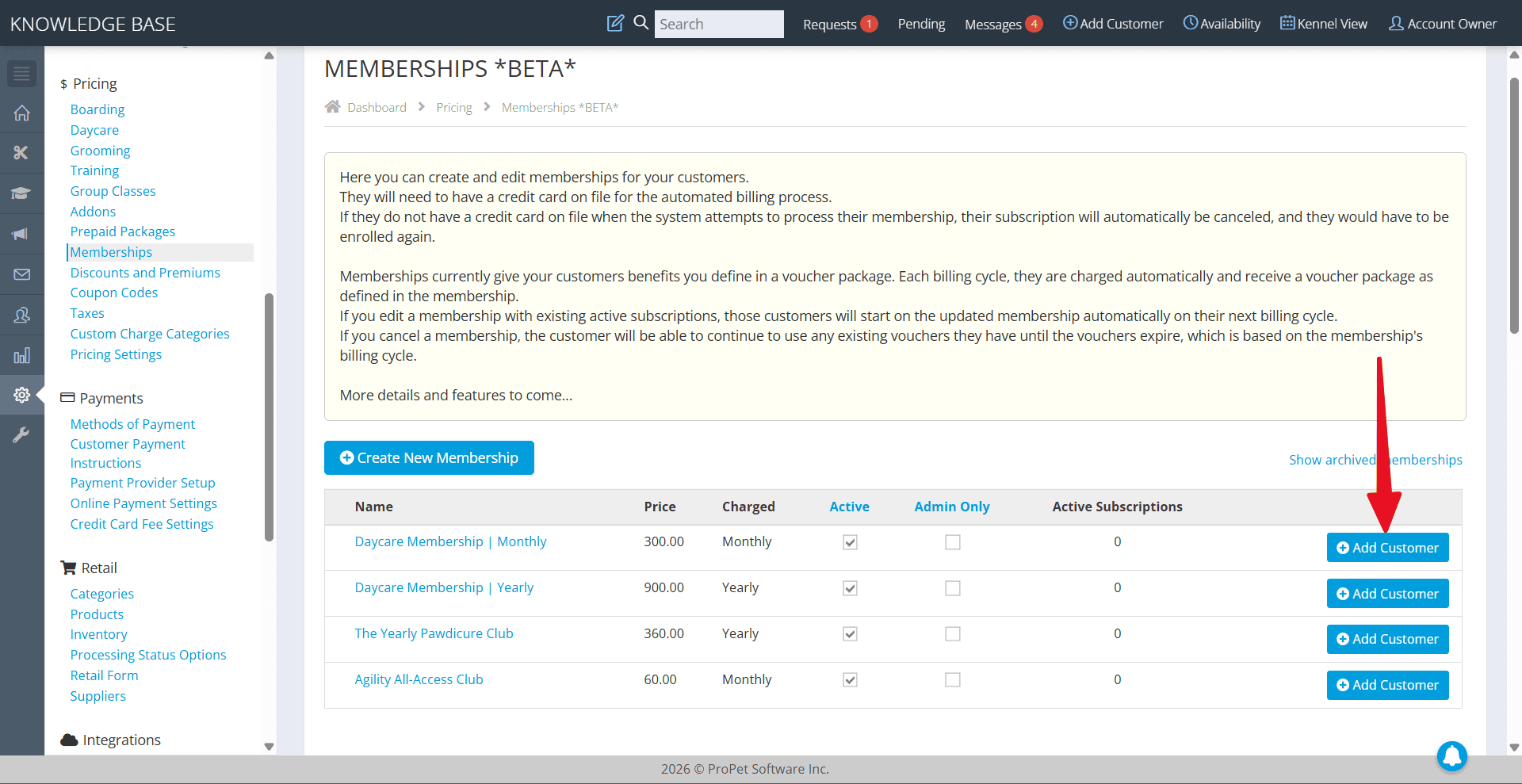
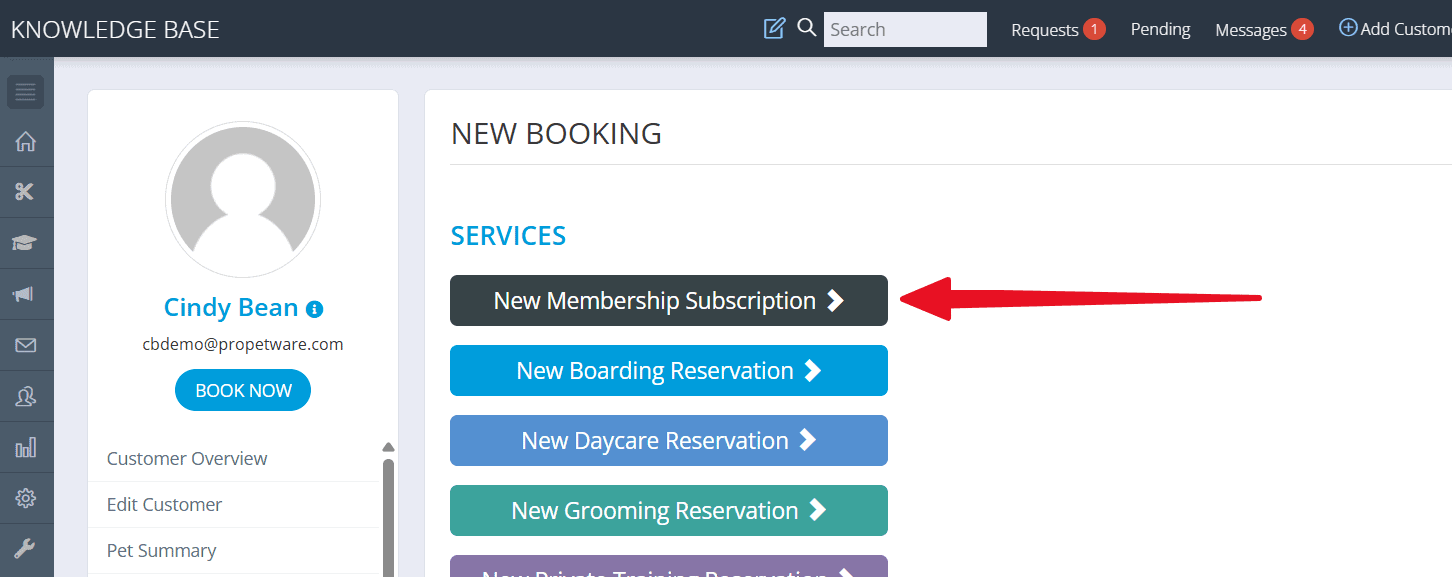
A customer can be registered for a membership either from the Memberships page in the Settings or directly from their profile using the Book Now button. When registering a customer, you will choose the start date of their billing cycle. They will only be invoiced, and the membership perks will only be available, on the selected start date. A new invoice will be automatically created for the same amount at the beginning of each billing cycle and the customer will receive an email upon each renewal.
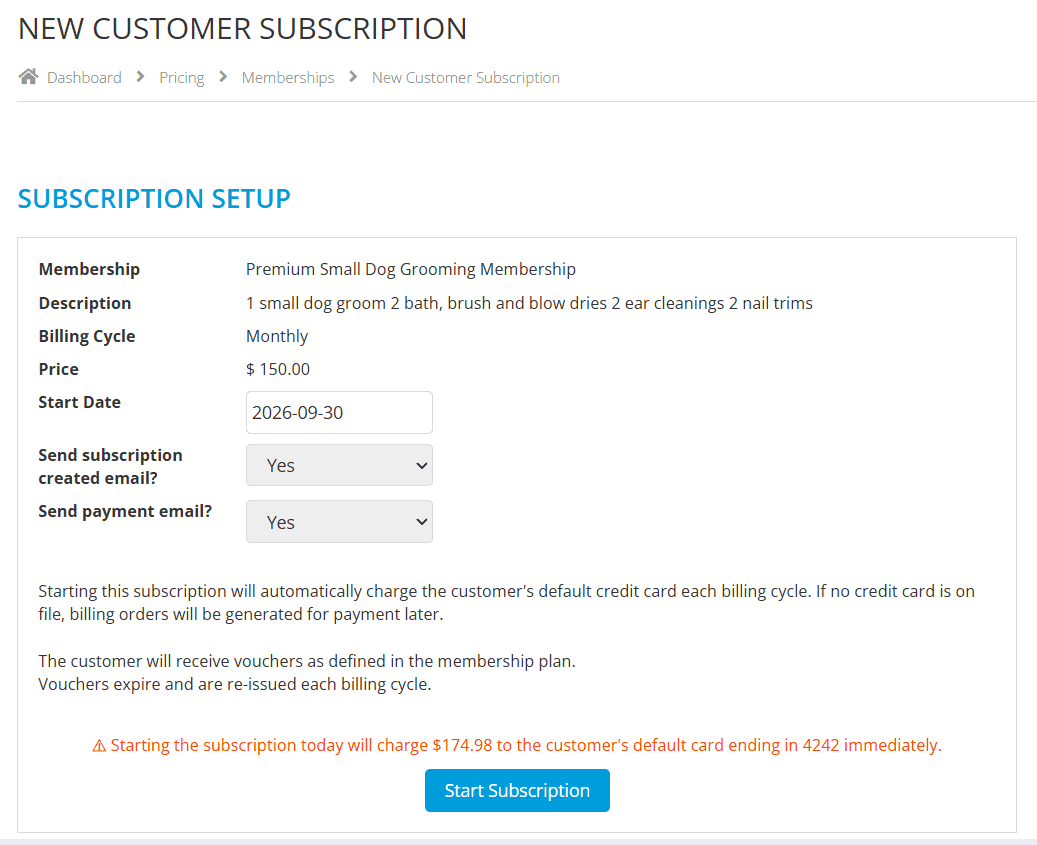
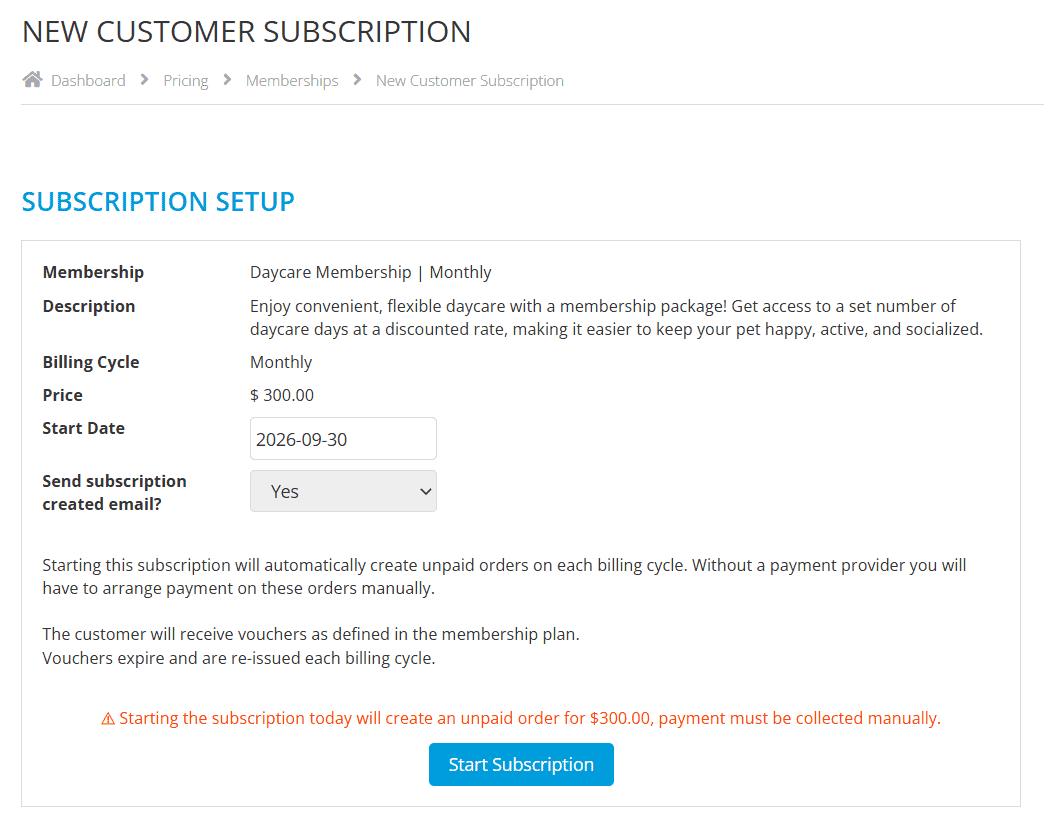
Before completing the registration, you can choose to send an email informing them of their membership registration and, on this page, you will also be able view any other membership subscriptions this customer already has.
If your ProPet account is integrated with an online payment processor, any customer registered for a membership will be automatically invoiced and have their credit card on file charged when the subscription renews. You can still use the membership feature if you are not integrated with an online payment processor, or if you are but your customer doesn’t have a credit card on file. A new invoice will still be automatically created at the beginning of every billing cycle, however, you will have to manage collection of the payment manually.
When a customer is invoiced for their membership registration, a new package with the membership benefits will be applied to their ProPet profile. They will be able to use the passes from this package on future bookings. These passes will expire and can no longer be applied to bookings once the membership cycle comes to an end, and you can choose if these passes are only applicable to bookings that take place within the invoicing time period.
For example, if you have a monthly daycare membership, you might choose for the passes from a package applied at the beginning of the month to only be available to be applied to daycare bookings that take place within that month and before the membership cycle restarts.
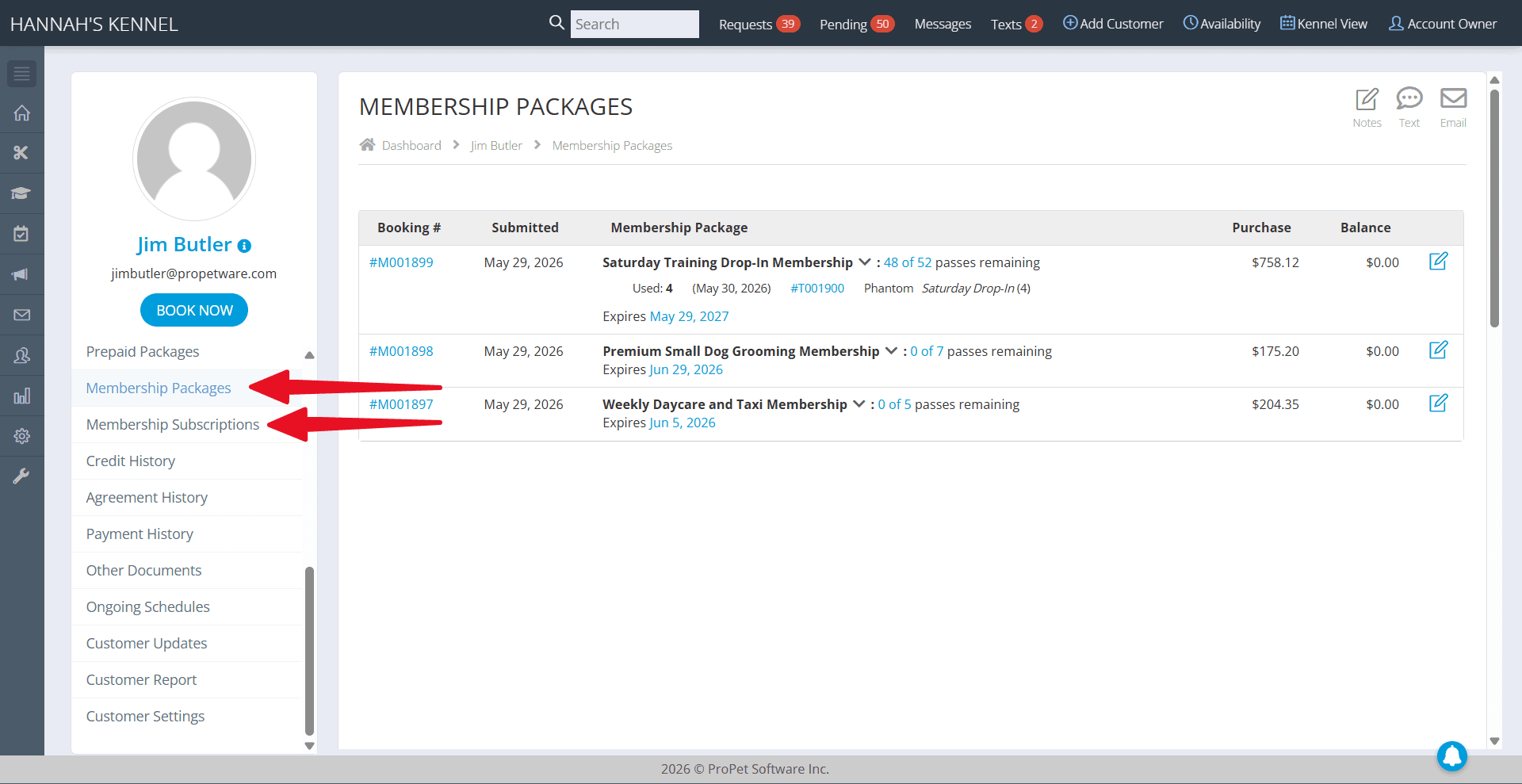
On a customer’s profile, you will see two new tabs: Membership Packages and Membership Subscriptions. In the Membership Packages page, you will be able to see all packages that have been applied to their profile as part of the membership benefits, along with the details of each package (pass rates included in the package, passes currently available, etc).
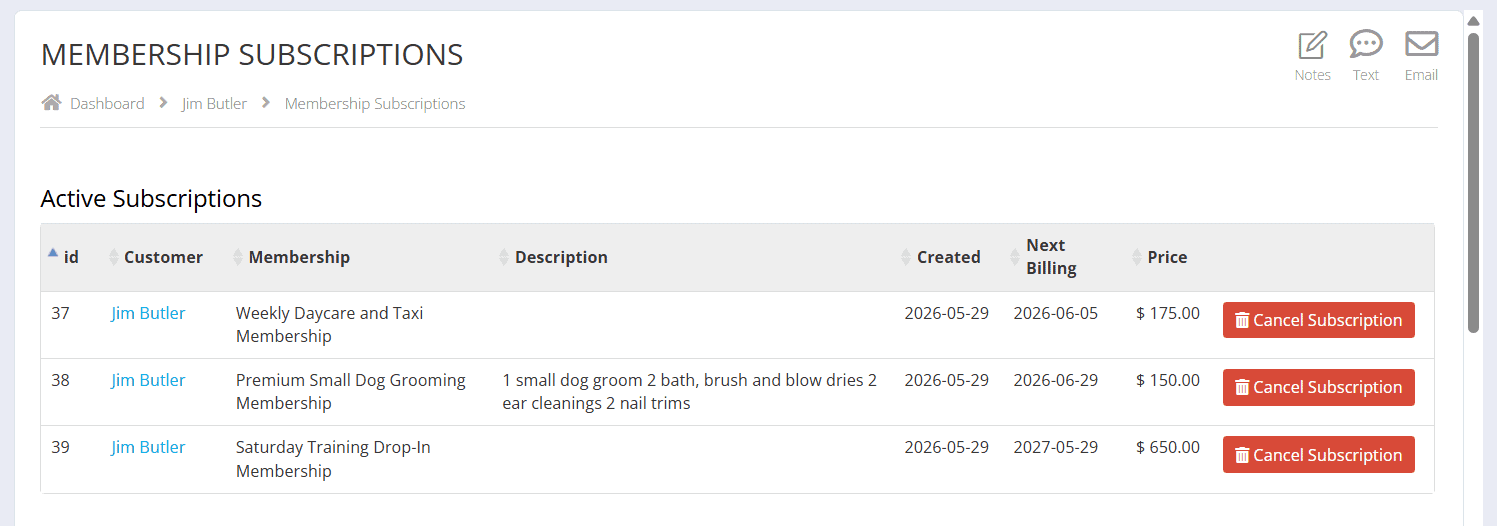
In the Membership Subscriptions page, you will be able to see all Active and Cancelled membership subscriptions that the customer has been registered for. The membership name, description, sign up date, next billing date, price and cancellation button will be displayed here.
You will also be able to view all the customers registered for a membership by clicking on the View Subscriptions button on the Memberships page in the Settings. This will also display the date they were registered for the membership, the next time they are scheduled to be invoiced and the billing amount. You also have the option to cancel their membership from this page.
If a customer’s membership registration is cancelled, they will still have access to their current membership package but they will no longer be invoiced or charged for the membership in the future and no additional membership packages will be applied to their profile.
Currently, a customer can only be registered for a membership in the admin portal, by a user at your facility. At this time, they are unable to do so themselves through the customer portal. This is an option we are working on adding and will be available in the near future.
Please note, Memberships is a feature that we plan to continue to update in the coming months according to our own plans, as well as, based on the feedback we receive from the ProPet users. We will do our best to consider which additions would positively impact the most ProPet users
Upcoming Updates
- Adding the option to allow customers to sign themselves up for memberships (and cancel) from the customer portal
- Adding role permissions for memberships
- Adding associated customizable email templates
- Creating a memberships report
- Adding sorting functionality to the memberships table in settings
- Adding the ability to clone a membership
Plans for Version 2
- Adding the option to automate discounts and coupon codes as benefits (for example, if a daycare membership includes 15% off one boarding stay)
- What are you looking for? Fill out our form with your membership specifics to help us determine what other membership features would be most useful.
Basics (recap):
- Billing cycle can be set to weekly, monthly or annually.
- Create a package of membership benefits that consist of prepaid passes.
- The passes expire at the end of the billing cycle, however, you can choose whether or not these passes must be applied to services that take place during the billing cycle only.
- A customer can be registered for a membership from the Settings > Memberships page or from their Profile > Book Now > New Membership Subscription page.
- Choose a customer’s start date when registering them for a membership subscription
- Send an email when a new customer is registered for a membership.
- View the customer’s other active memberships when registering them.
- Automatically charge a customer’s credit card (or have a new invoice created) at the beginning of every new billing cycle.
- The customer is emailed upon each new charge or invoice creation.
- Cancel your customer’s membership at any time to prevent future credit card charges.
- View a customer’s membership packages and subscriptions from their profile
- View all customers registered for a membership under View Subscriptions in the Membership settings.

Recent Comments